AI Character Kit
Create one AI character. Keep her face in any scene. Make her move. 4 ComfyUI workflows, no LoRA training.
- 4 workflows
- No LoRA training
- Images and video
- 24 GB GPU or rented
Can an AI character film a product ad?
Yes. Workflow 04 takes a driving clip and moves your character the same way, mouth, hands and product included. On the left, the driving video. On the right, Seo-yeon holding the same tub. Then the finished vertical ad.
All people and brands shown are fictional and AI-generated. The driving clip on the left was itself made with workflows 01 and 03. Nothing here uses real people or third-party footage.
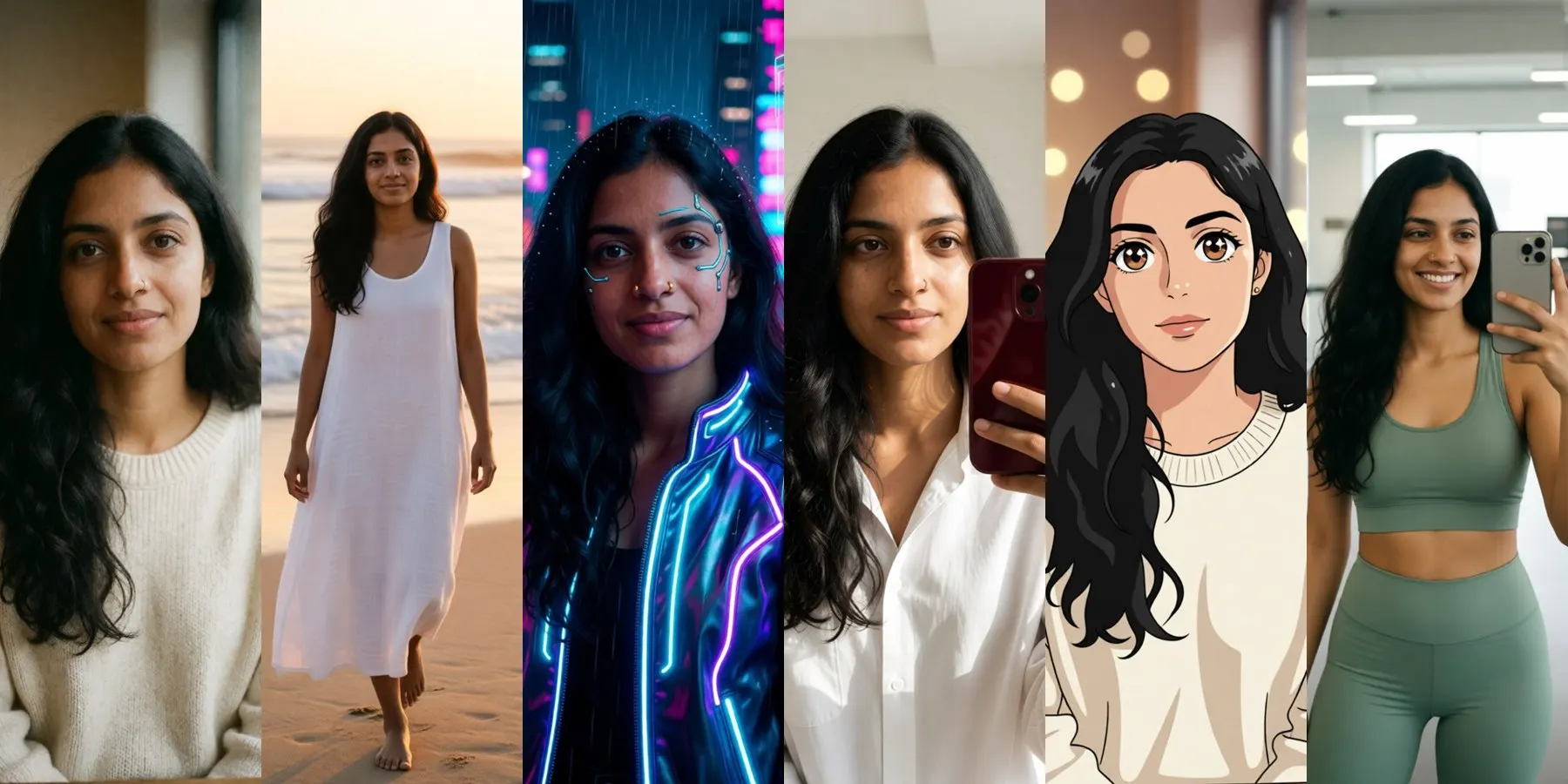
How do you keep the same face in every scene?
You make the character once, then every other image starts from that one picture. Ask for a beach, a rainy city, a gym or a cyberpunk poster in one sentence. About 15 seconds per scene on a 3090 Ti.
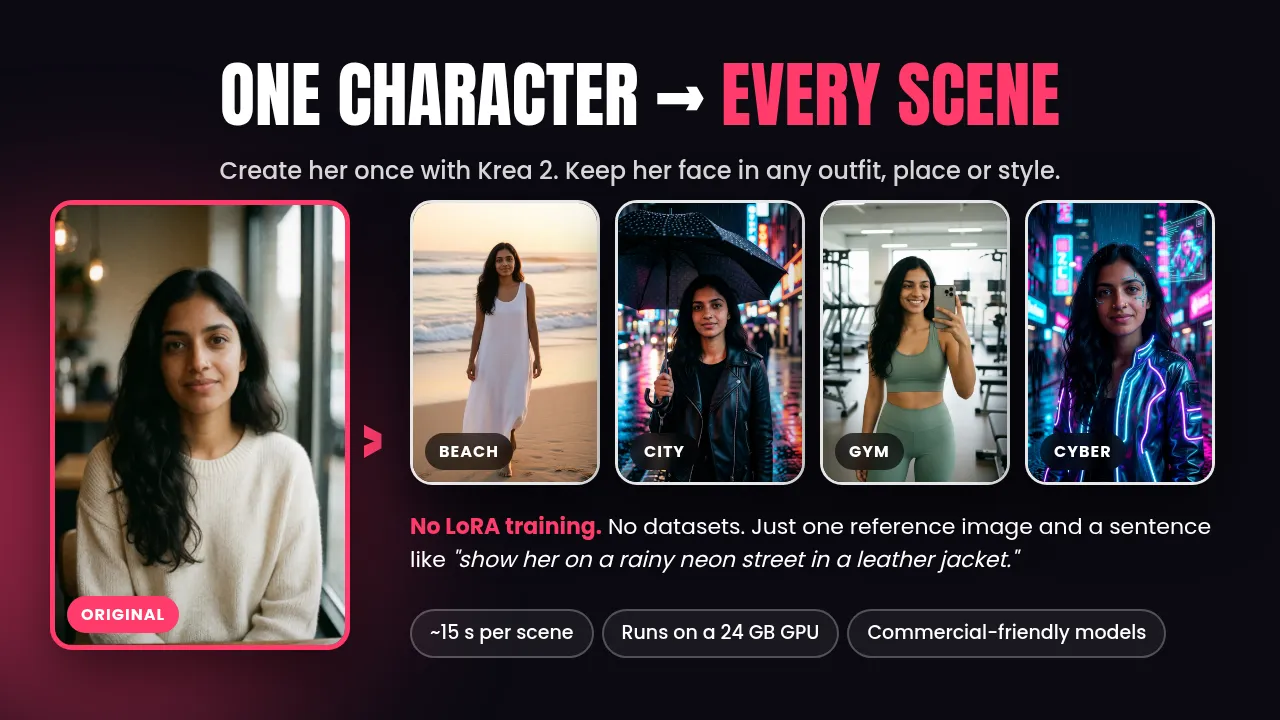
More on this in how to keep the same face without LoRA training.
Can one still image move?
Workflow 03 turns any image into a 5 second clip with Wan 2.2 14B in about 2 minutes. Describe the motion, not the person: the image already knows who she is.
- 480 x 832 portrait, 81 frames at 16 fps
- 4 steps total with the LightX2V LoRAs
- Upscale to 1080 x 1920 for posting
See the Wan 2.2 settings that work on 24 GB.
What does a finished reel look like?
This 23 second vertical reel was made only with the four workflows, then cut together with captions. One character, many scenes, a moving shot and a product swap.
The guide walks through the same recipe: character with product, driving clip, swap, upscale, captions. The sample ad took about 15 minutes from start to finish.
Get the kit, $39What's inside the kit?
Four ready-to-run ComfyUI workflows, each with its models, settings and note boxes already set up. They use native ComfyUI nodes, so there are no custom nodes to install.
- 01~32 s
Character Creator
Krea 2 Turbo
Write one prompt and get a photoreal base character at 896 x 1344 with real skin texture: pores, fine hair, natural tones. This picture becomes the master copy of her face.
- 02~15 s
Same Character, New Scene
Qwen-Image-Edit 2511
Give it the base image and one sentence. New outfit, new place, even anime or cyberpunk. The face stays the same because it comes from the picture, not from luck.
- 03~2 min
Image to Video
Wan 2.2 14B
Turn any still into a 5 second clip at 480 x 832 with the 4 step LightX2V LoRAs. A smile, a head turn, hair in the wind, a slow walk.
- 04~3 min per 5 s
Character Swap
Wan Animate 2
Copy the motion, expressions and lip movement from a driving video you own onto your character, product in hand. This is the workflow behind the ad demo.
Plus
- PDF guideSetup on your own PC or a rented GPU, every setting explained, and fixes for the problems people actually hit.
- 64 tested promptsCharacters, scenes, art styles, ultra-real phone photos, motion and product shots. Copy, paste, change the details.
- Sample packA fictional demo character with all the source images, so every workflow opens with something already loaded.
- Vast.ai setup script includedAn on-start script for the PyTorch (Vast) template that downloads the models for you, plus a step by step rental guide.
- Free updatesWhen better open models come out, the workflows get updated and you get the new version at no extra cost.
How fast is it on an RTX 3090 Ti?
Measured after the models were loaded once. The first run of each workflow is slower because the models load from disk. An RTX 4090 is about 1.5 to 2 times faster.
| Step | Size | Time |
|---|---|---|
| New character | 896 x 1344 | ~32 s |
| New scene, same face | ~1 megapixel | ~15 s |
| 5 s video | 480 x 832, 81 frames | ~2 min |
| 5 s character swap | 480 x 848 | ~3 min |
What do you need to run it?
Your own PC
- NVIDIA GPU with 24 GB VRAM (RTX 3090, 3090 Ti, 4090, 5090)
- 32 GB system RAM or more
- About 100 GB free disk for all four workflows
- ComfyUI, latest version
Or a rented GPU
- An RTX 3090 or 4090 on Vast.ai for about $0.25 to $0.40/hr
- Vast.ai setup script included
- Pick a host with free or cheap download bandwidth: the kit pulls about 93 GB of models
- Stop the instance on breaks, destroy it when done
Models
- Free official downloads from Hugging Face
- Not bundled with the kit
- Every direct link and folder listed
- Install one workflow at a time if disk is tight
Mac and AMD are not supported. Renting? Read running ComfyUI on Vast.ai cheaply first, bandwidth costs included.
Can you sell what you make?
For most people, yes. Here is how each model was licensed as of October 2026.
Licenses can change. Read the license on each model's official page before commercial use. This is not legal advice.
| Model | License | Commercial use |
|---|---|---|
| Wan 2.2 14B I2V | Apache 2.0 | Allowed |
| Wan Animate 2 | Apache 2.0 | Allowed |
| Qwen-Image-Edit 2511 | Apache 2.0 | Allowed |
| Krea 2 Turbo | Krea Community License | Allowed under $1M yearly revenue |
What are the rules?
- Fictional characters only. Don't recreate real people, celebrities, or anyone you know without their clear permission.
- Your own footage only. Driving videos, voices and music must be yours or licensed to you. Don't turn creators' TikToks into your ads.
- Fictional or your own brands. No other companies' logos or packaging unless they hired you.
- Label AI content where platforms ask you to. TikTok and Instagram both do.
- Never sexual content of anyone who looks under 18, and no non-consensual or deceptive content.
Every person and brand on this site (Aanya, Seo-yeon, Mia, BERRY GLOW) is fictional and AI-generated.
Questions people ask
Do I need to train a LoRA?
No. One reference image is enough. Workflow 02 copies the face from your base image every time, so there is no dataset and no training run. If you want a LoRA later, the images you make with workflow 02 are a good training set.
What GPU do I need?
An NVIDIA card with 24 GB of VRAM, such as an RTX 3090, 3090 Ti, 4090 or 5090. Peak use in testing was about 17.4 GB for images and 16.5 GB for video. You also want 32 GB of system RAM and about 100 GB of free disk for all four workflows.
I don't have a 24 GB GPU. Can I still use it?
Yes. Rent one on Vast.ai for about $0.25 to $0.40 an hour. A Vast.ai setup script is included, along with a guide to picking a machine. Pick a host with free or cheap download bandwidth, because the kit pulls about 93 GB of models.
Does it work on a Mac or an AMD card?
No. The workflows are built and tested for NVIDIA GPUs only.
Are the models included?
No. The model weights are free downloads from the official Comfy-Org and lightx2v pages on Hugging Face. The kit includes a models list with every direct link and the folder each file goes in.
Can I sell the images and videos I make?
For most people, yes. Wan 2.2, Wan Animate 2 and Qwen-Image-Edit 2511 are Apache 2.0. Krea 2 uses the Krea Community License, which allows commercial use if your yearly revenue is under $1M. Read each license on its official page before commercial use.
Is it beginner friendly?
Yes, if you can install ComfyUI. Load the workflow, swap the image, edit one prompt and press Run. The settings are already set and the guide explains each one.
Can I swap a real person or a TikTok clip into a video?
No. The kit is for fictional characters only. Use driving videos and voices you own or have permission to use, or generate the driver with workflows 01 and 03.
What if it doesn't work for me?
Send a message. I'll help you get it running, and if it still doesn't work I'll refund you within 14 days of purchase.
Want to learn the workflows first?
- Making longer AI videos in ComfyUI: chaining clips and the Wan Animate loopTwo honest ways past the 5 second limit in ComfyUI: chaining Wan 2.2 clips from the last frame, and letting the Wan Animate 2 loop follow a long driving video.
- Running ComfyUI on Vast.ai cheaply, bandwidth costs includedRent a 24 GB GPU on Vast.ai for ComfyUI without surprise bills: picking a host, the download charge most guides skip, disk sizing, and stop versus destroy.
- Commercial licenses for open AI models: Krea 2, Qwen Image Edit and Wan explainedCan you sell what you make with Krea 2, Qwen-Image-Edit 2511, Wan 2.2 and Wan Animate 2? A plain reading of Apache 2.0 and the Krea 2 Community License.
Get the AI Character Kit
$39 $49
- 4 ComfyUI workflows
- PDF guide, 64 prompts, sample pack
- Vast.ai setup script included
- Free updates
- Help or a refund within 14 days if it doesn't work
Instant download. Models are free and downloaded separately.